



Porting your mobile number in Switzerland: How to take your number with you
Switching to a new mobile plan often fails because of one single worry: "What happens to my number?". No one wants to have to tell all their contacts, their bank, and various online services a new mobile number.
The good news: porting your mobile number is easier today than ever before. Especially in Switzerland, the process is strictly regulated and designed to be very customer-friendly. If you choose a digital provider like swype, you can even handle the entire switch comfortably from your sofa. We’ll show you what to look out for, how the porting process runs smoothly, and what costs you’ll actually face.
The biggest mistake when switching providers

Before we get to the steps, let's talk about the most common mistake when switching: you cancel your old plan yourself. Please don't do that! If you cancel your old contract independently, you run the risk of your number being irrevocably deleted at the end of the contract term.
If you want to port your number, you simply have to commission the new provider (for example, swype) to do it. Your new provider then automatically takes care of the cancellation with your previous provider. This ensures that the transition works seamlessly and your number stays safely with you.
Port your mobile number to swype in 3 simple steps
Switching doesn't have to involve mountains of paperwork or endless calls to a hotline. At swype, we have completely digitized number porting. Here's how you do it: a valid identification document. The process is intuitive, but if you have any doubts, you will find a helpful tutorial on our website that will guide you through the registration process.
1. Download the swype app and create an account
Everything starts in the app. Download the free swype app to your smartphone and create your profile in just a few minutes. You only need a valid ID. The process is self-explanatory, but if you’re unsure, you’ll find a helpful tutorial on our website to guide you through registration.
2. Select "Keep number"
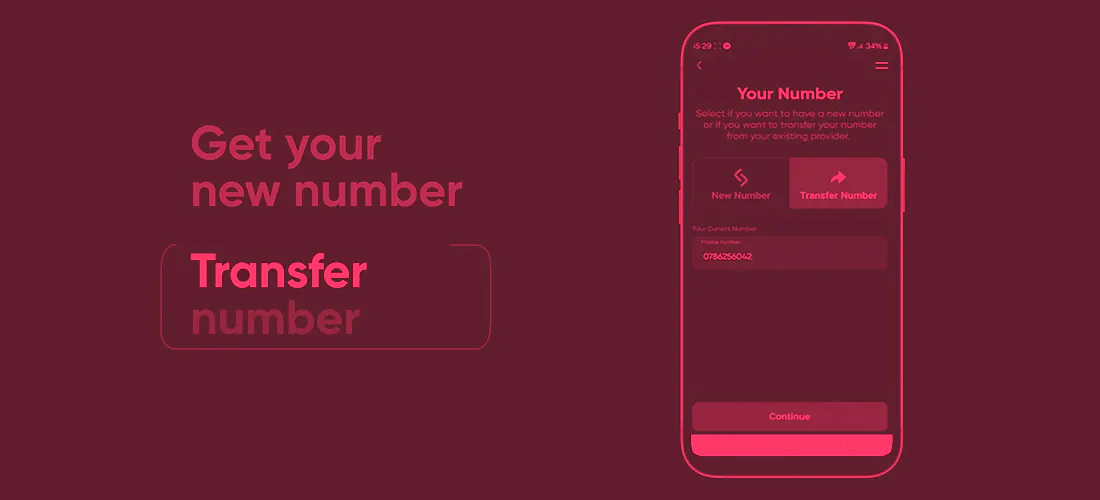
During the registration process, you’ll be asked if you want a new number or if you want to take your old number with you. Simply choose "Keep number" (Porting) here. Enter your current mobile number and confirm the porting request digitally in the app. This gives us the power of attorney to clear everything else with your old provider.
3. Sit back and wait for the eSIM
That’s already it from your side! We’ll contact your previous provider, cancel your contract for the next possible date, and secure your number. If you choose an eSIM, your new profile will be digitally activated on your phone right on the day of the switch. If you prefer a physical SIM card, we’ll send it to you by post in good time.
What does number porting cost in Switzerland?
When it comes to switching, people often search for information about porting costs. There is a very clear answer here: porting itself is free of charge in Switzerland. Your old provider is not allowed to charge you for simply taking your number with you. At swype, taking over your mobile number is also completely free.
Important note: Costs can only arise if you leave your old contract before the end of the minimum contract term (so-called early termination fees). To prevent this from happening to you, swype asks your old provider for the regular end of the contract during the porting process and plans the switch exactly for this date.
Frequently Asked Questions (FAQ) about number porting
Despite the simple process, a few small uncertainties often still arise. Here are the most important answers:
How long does the porting take?
That primarily depends on the notice period of your previous contract, which is usually 30 to 60 days. We will inform you of the exact date of the switch immediately via SMS and in the app as soon as your old provider has confirmed the date to us. If you have a prepaid plan, the switch often happens within a few working days.
Will I be offline during the switch?
No, definitely not! This is a common myth. You continue to use your old SIM card as normal until the day of the switch arrives. On the cut-over day (usually during the morning), your old SIM card will lose the network. That’s the sign for you: simply swap the SIM card or activate your new eSIM in the settings. The interruption usually only lasts a few minutes, and you're already back online in the first-class swype network – with your familiar number.
Switching providers and taking your own number with you is no longer rocket science. With the right app, you save yourself annoying hold music and paperwork. Just download the swype app, choose your new plan, and let us do the work in the background.